Admin
Claude CoWork is a non-technical interfact for Claude Code and enables traditional office administration to be done in an 'Microsoft Office' way.
Claude has plugins to place directly in Office products.
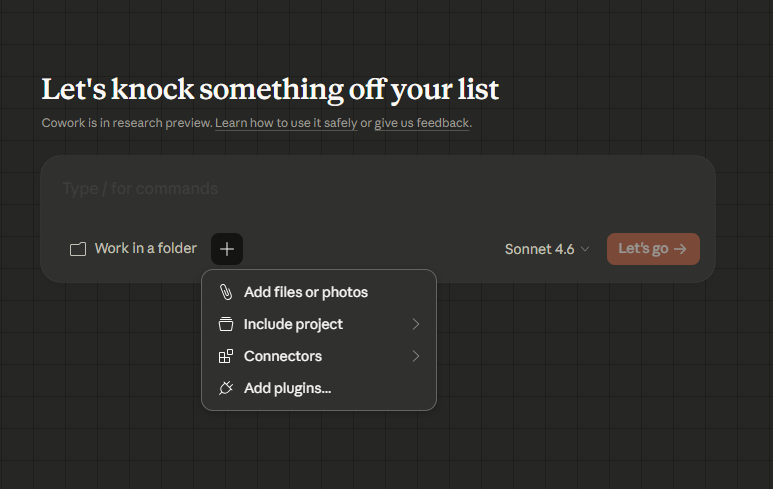
One of many tutorials on YouTube for learning 'CoWork':
https://www.youtube.com/watch?v=cJ2QCyr3yzU
The Hidden Cost of Administration
Administration is the tax on running a business. Email, scheduling, document drafting, and CRM upkeep are not the work — they are the overhead that surrounds the work. For a One Person Enterprise, this overhead can consume 30–40% of a working week.
AI agents do not eliminate administration, but they dramatically reduce the cognitive load and time cost of each task.
Email Triage and Response Drafting
Email is the highest-friction admin task for most solo operators. The goal is not inbox zero — it is spending less than 20 minutes per day on email while missing nothing important.
Triage workflow:
Export or copy incoming emails to a text file, then:
Read /admin/inbox-2026-03-04.txt.
For each email:
- Assign priority: Urgent, Normal, Low, or FYI-only
- Summarise in one sentence
- Suggest action: Reply, Forward, Archive, or Schedule
- For emails requiring a reply, draft a 3-sentence response

Output a triage table followed by draft replies.
Review the triage table (2 minutes), approve or edit draft replies (10 minutes), send. Done.
CLAUDE.md email rules:
## Email Style
- Replies: short and direct, no filler phrases ("Hope you're well")
- Tone: professional but warm
- Always end with a clear next step or question
- Standard sign-off: "Best, [Name]"
Calendar and Task Management Automation
Claude Code can help you plan your week and manage tasks without a complex system.
Weekly planning prompt:
Read /admin/tasks-backlog.md and /admin/calendar-this-week.txt.
Suggest a daily schedule for the week that:
- Prioritises revenue-generating work in the morning
- Batches admin tasks into one 90-minute block per day
- Leaves buffer time each afternoon
- Accounts for the meetings already in my calendar
Task capture from messy notes:
I have rough notes from today in /admin/notes-2026-03-04.txt.
Extract all action items, assign each a priority (High/Medium/Low),
and append them to /admin/tasks-backlog.md in the correct priority section.
Document Drafting
Claude Code can draft any standard business document from a brief. Common use cases:
Proposal:
Draft a project proposal for the brief in /admin/briefs/acme-2026-03.txt.
Use the structure in /templates/proposal-template.md.
Budget: £8,000. Timeline: 6 weeks. Deliverables: as specified in brief.
Contract (standard services):
Draft a standard services agreement for a 3-month consulting engagement.
Client: Acme Ltd. Rate: £800/day. Payment terms: 30 days.
Use the clauses in /templates/contract-clauses.md.
Flag any clauses that may need legal review.
SOP (Standard Operating Procedure):
Write an SOP for onboarding a new client.
Steps should cover: initial call, proposal, contract, project setup,
first delivery, and feedback collection.
Format as a numbered checklist with sub-steps.
CRM-Lite With Markdown and Agents
A full CRM is overkill for most solo operators. A simple contacts.md file, maintained by Claude Code, is often enough.
contacts.md structure:
## Acme Ltd — Jane Smith (jane@acme.com)
- Status: Active client
- Last contact: 2026-02-15 — Sent Q1 report
- Next action: Follow up on renewal by 2026-03-15
- Notes: Prefers email over calls. Decision maker is CEO Tom Brown.
Weekly CRM review:
Read /admin/contacts.md.
Find all contacts where:
- "Next action" date is in the past
- "Last contact" is more than 60 days ago and status is "Warm lead"

Produce a follow-up list with suggested one-line messages for each.
Useful MCPs for Admin
| MCP | Use Case |
|---|---|
filesystem |
Read and write all admin documents and CRM files |
fetch |
Pull in information about contacts or companies before a meeting |
browser |
Research contacts, check LinkedIn, verify company details |
Skills to Develop
- How to structure a plain-text or Markdown-based task and CRM system
- How to write an effective email brief (context, desired outcome, tone)
- Basic contract and proposal structure for your service type
- How to set up a simple filing system that Claude Code can navigate reliably
Innovative Ideas
- Meeting prep agent: Before any meeting, give Claude Code the contact's name and company and ask it to produce a one-page briefing from public sources
- End-of-day review: Each evening, run a prompt that reads your notes, emails, and task list and produces a 5-bullet summary of what was accomplished and what is outstanding
- Proposal win/loss tracker: Maintain a log of proposals sent and outcomes. Ask Claude Code to analyse win rates by industry, price point, and project type quarterly.
- Automated follow-up scheduler: Ask Claude Code to scan your contacts file weekly and flag anyone due for a check-in, then draft a personalised one-line message for each